Savings calculator 💸
Last updated on
Welcome to your first coding project! Note that I expect you to have completed the lessons in the TypeScript fundamentals section. If you haven’t, start here.
In this project, we will code a savings account calculator. It will help you practice the basics we’ve covered in previous lessons and reinforce these concepts with a concrete example.
Here’s what you’ll see in your terminal when completing this project. Your calculator will randomize the annual interest rates, so sometimes you’ll win 📈, and sometimes you’ll lose! 📉
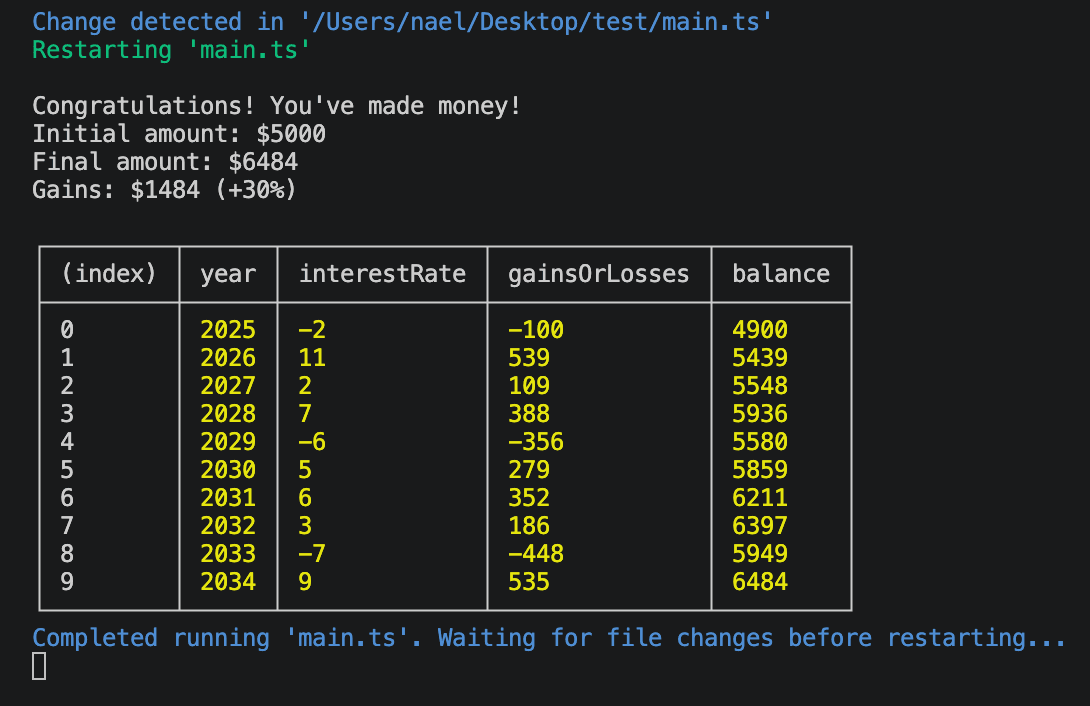
What’s the question?
In journalism (and many other fields), it’s important to clearly identify the question we want to answer from the start.
Here’s the question we want to answer today:
- How much could I make by putting my money into a savings account?
In my projects, I like to identify an indicator early on that will provide the answer to the question. Here, the indicator would be the difference between the initial amount and the final balance in the account.
Usually, there are also some variables or parameters that can be identified when starting a project. Here are a few factors that can impact the results:
- The initial amount of money.
- The interest rate of the account.
- The fluctuation of the interest rate.
- The number of years the money will stay in the account.
Also, to simplify our lives, let’s decide to work with annual rates, so we will update the account balance just once a year.
With this in mind, we can start coding our calculator!
Setup
Create a new, empty folder on your computer, open it with VS Code, and create a file named main.ts inside it.
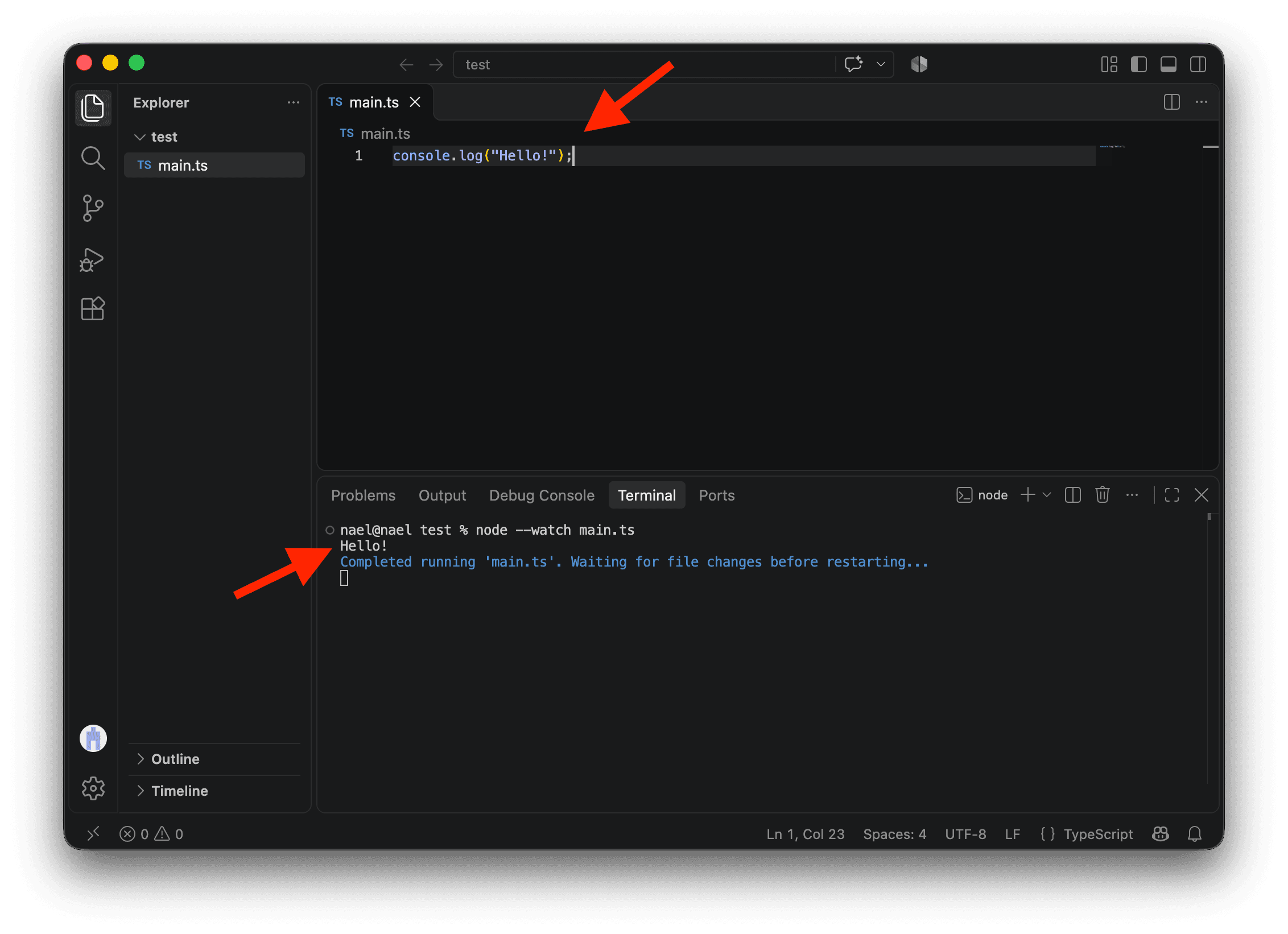
Type this code in main.ts and save the file:
console.log("Hello!");Open the terminal (Command + J on Mac or Control + J on Windows) and run this command:
node --watch main.tsThis runs our code and automatically runs it again each time we save a change, so we can see the results as we work.
Number of years
If the money stays in the savings account for 10 years, it means we need to update the balance 10 times, once every year.
This sounds like a perfect job for a loop!
Let’s start by iterating over the years. We could create a variable years so it will be easy to update the number of years we want and rerun the script.
const years = 10;

for (let year = 0; year < years; year++) {
  console.log({ year });
}You might be wondering what { year } is in the code above. It’s a shorter way of writing { year: year }. It tells your computer to create an object with a key year associated with the value in the variable year. Short and sweet, isn’t it?
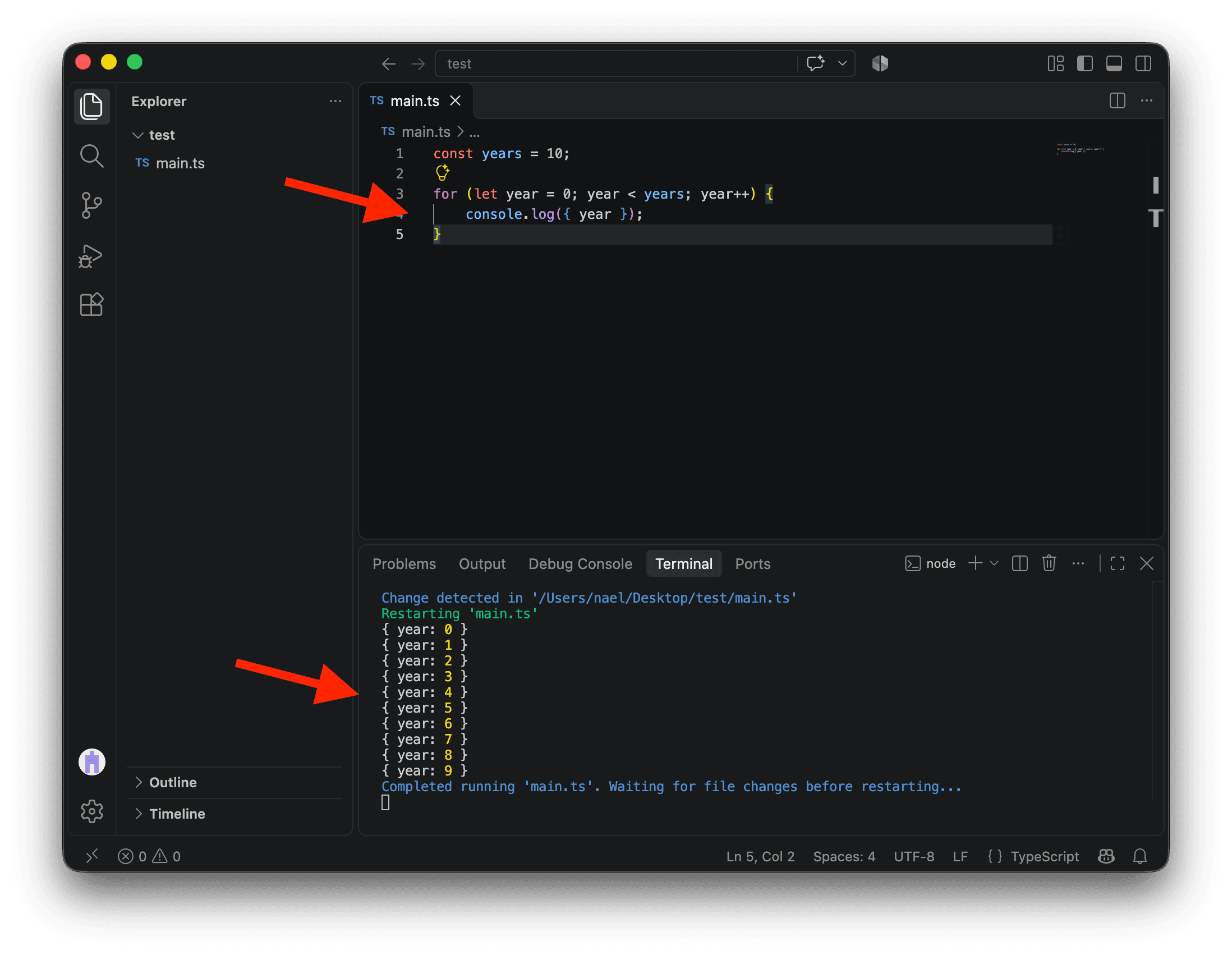
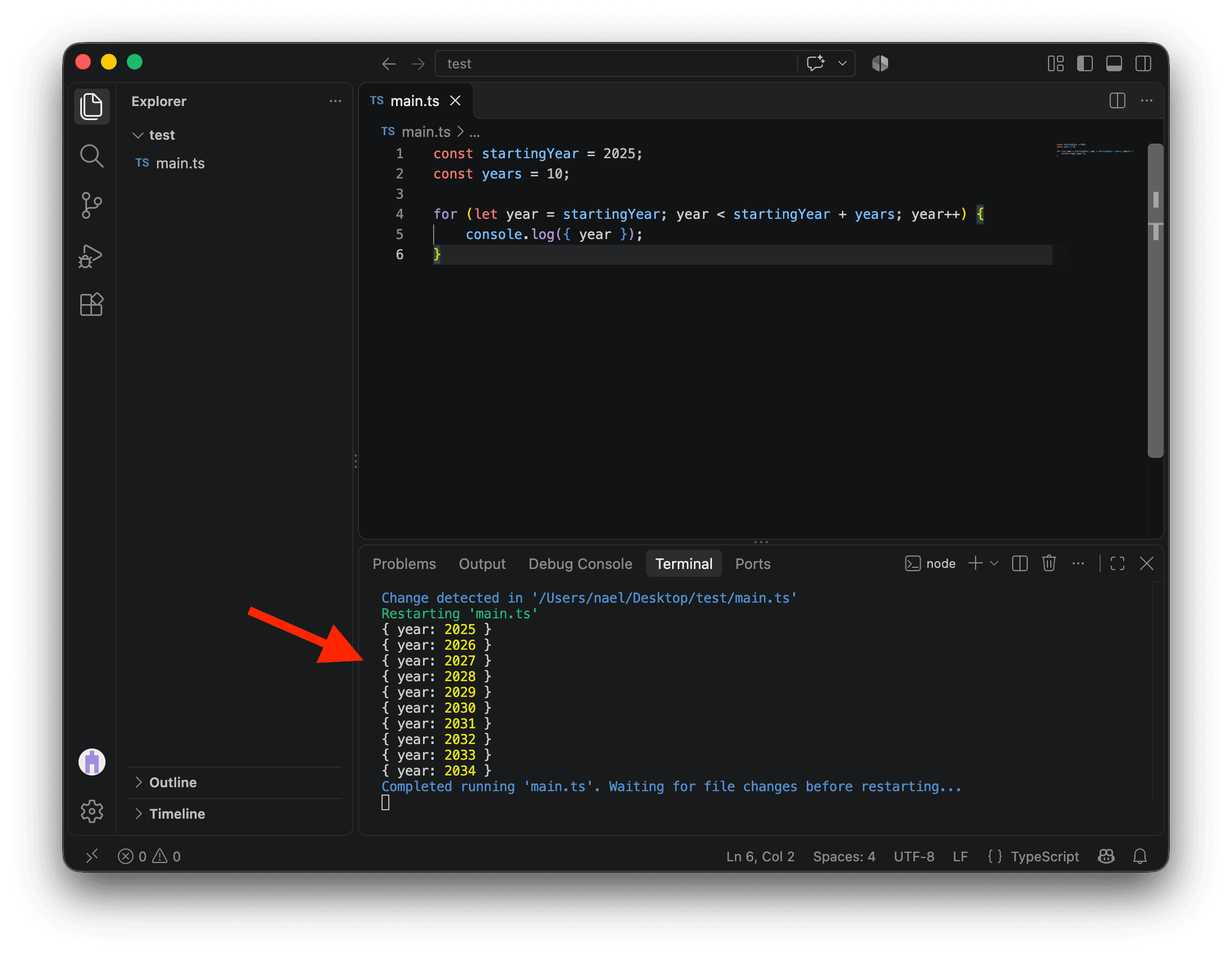
Instead of having numbers from 0 to 9, it would be better to have actual years.
Let’s add a variable startingYear and update our code.
Here’s what’s happening with our loop on line 4 now:
let year = startingYearmeans that our loop will start with theyear2025.year < startingYear + yearsmeans that our loop will run whileyearis smaller than2025 + 10.year++means thatyearwill increment by 1 on each iteration.
const startingYear = 2025;
const years = 10;

for (let year = startingYear; year < startingYear + years; year++) {
  console.log({ year });
}
While we’re at it, we could store each object for each year in an array named results and log everything as a table.
const startingYear = 2025;
const years = 10;

const results = [];

for (let year = startingYear; year < startingYear + years; year++) {
  results.push({ year });
}

console.table(results);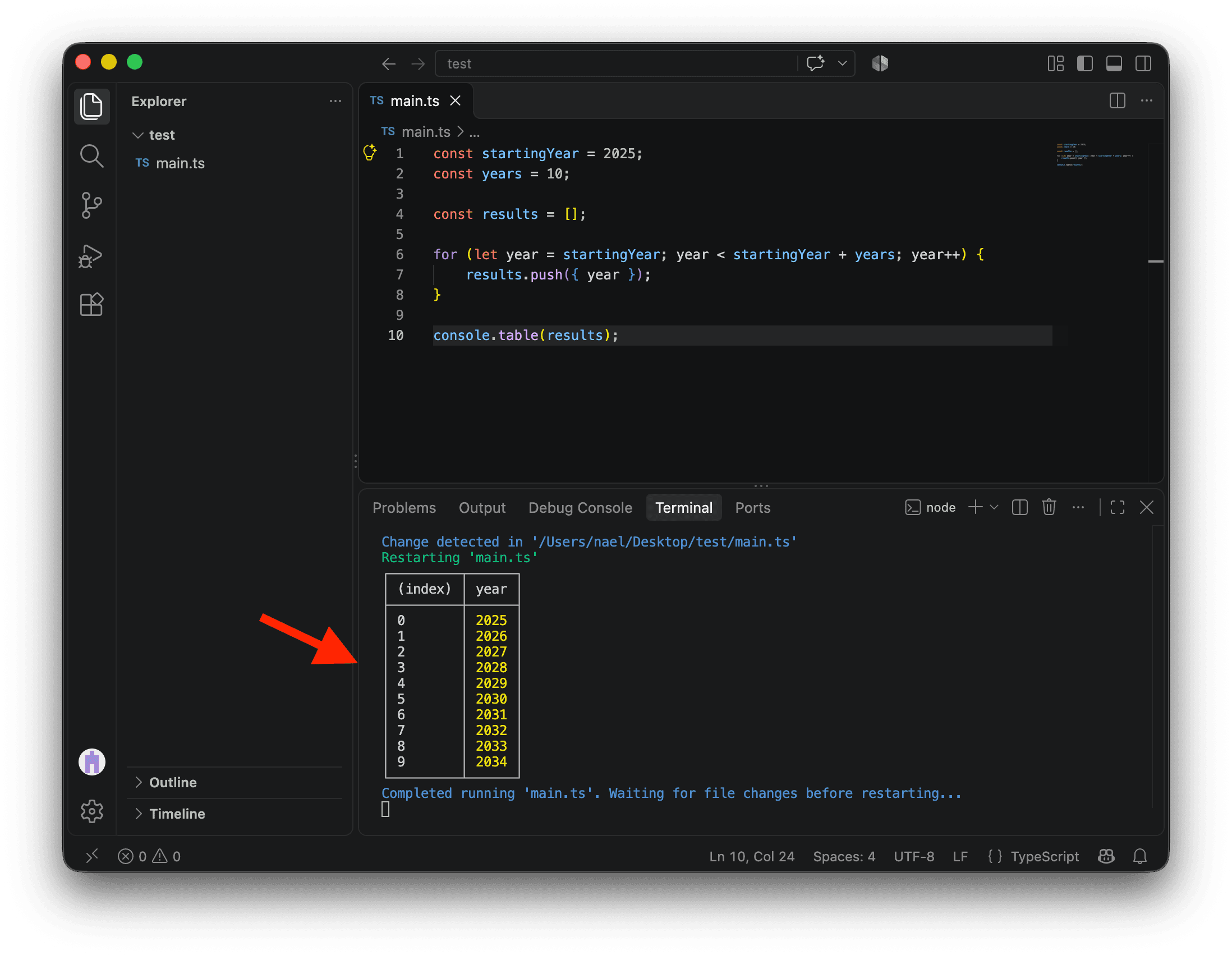
Interest rate and balance
Now, let’s talk money!
We could create three new variables:
initialAmountto store the money we put in the savings account at the beginning. I’ve put $5,000 in it.interestRateto store the annual interest rate. I’ve set it at 2%.balance, which represents the balance of the savings account. This should be created withletbecause we will update it every year in our loop. Initially,balanceequalsinitialAmount.
const initialAmount = 5000;
const interestRate = 2;
const startingYear = 2025;
const years = 10;

let balance = initialAmount;

const results = [];

for (let year = startingYear; year < startingYear + years; year++) {
  results.push({ year });
}

console.table(results);
In our loop, we can now create the variable gainsOrLosses to store the gains or losses for each year and then update balance accordingly.
We can also add gainsOrLosses and balance to our results.
const initialAmount = 5000;
const interestRate = 2;
const startingYear = 2025;
const years = 10;

let balance = initialAmount;

const results = [];

for (let year = startingYear; year < startingYear + years; year++) {
  const gainsOrLosses = balance * (interestRate / 100);

  // This is a shorter way of writing:
  // balance = balance + gainsOrLosses
  balance += gainsOrLosses;

  results.push({ year, gainsOrLosses, balance });
}

console.table(results);Note that gainsOrLosses is created inside the loop curly brackets. It’s scoped inside the code block delimited by the {}, which means it only exists within it. If you try to log it on line 19, you’ll get an error. Scoping is an important feature that helps avoid variable conflicts, but it also allows the computer to free up memory when something is no longer needed.
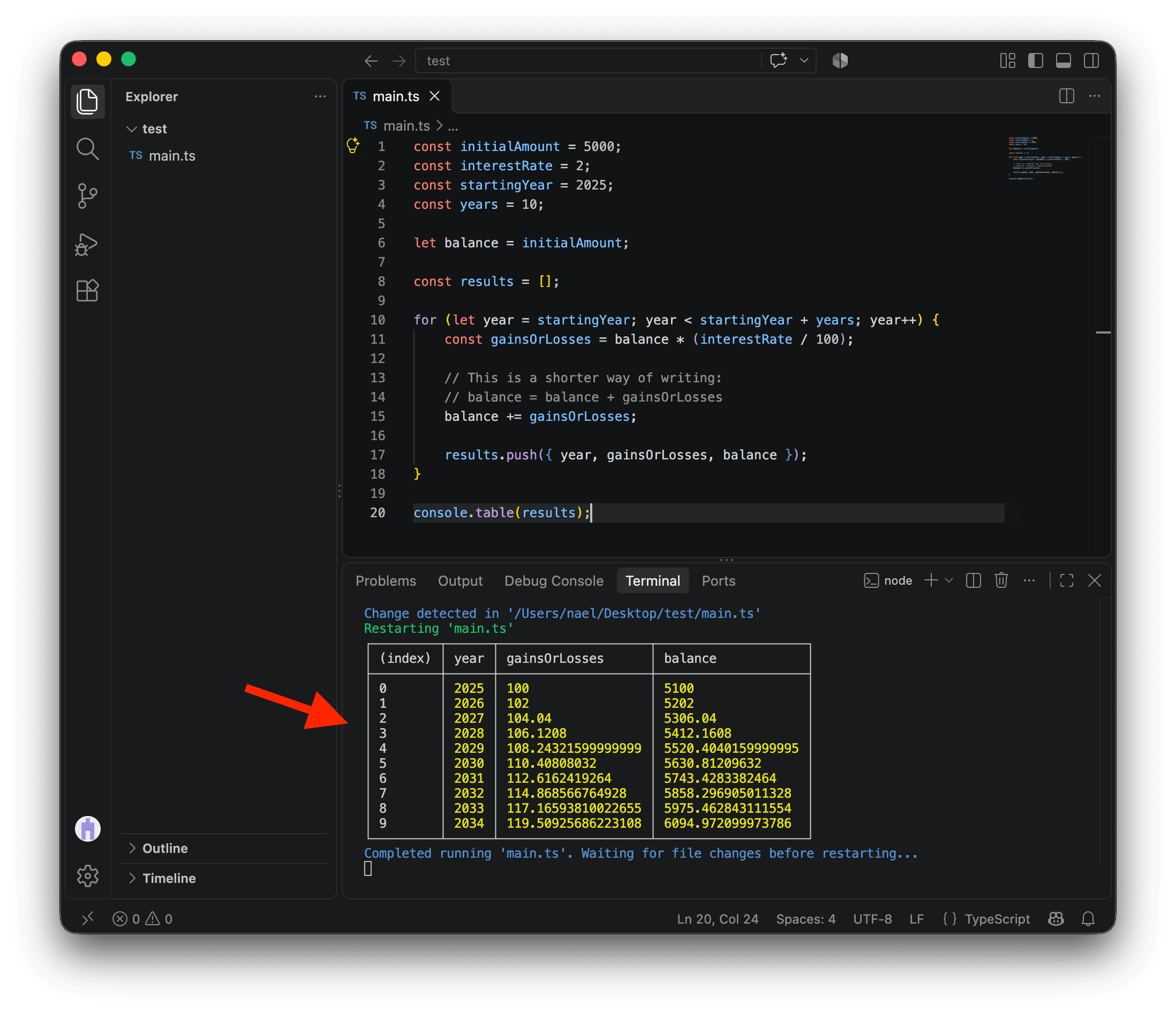
It works! You already have a basic savings account calculator! Do you see the compounding interest making your money grow? 💵
Now, let’s improve it.
Rounding values
By default, our computers don’t round values. We need to tell them to do it.
To do so, we can rely on the Math built-in global object. It’s always available when you code and contains many convenient methods and constants. In our case, we will use Math.round(), which rounds a number to the nearest integer.
Here, we just need to round gainsOrLosses.
const initialAmount = 5000;
const interestRate = 2;
const startingYear = 2025;
const years = 10;

let balance = initialAmount;

const results = [];

for (let year = startingYear; year < startingYear + years; year++) {
  const gainsOrLosses = Math.round(balance * (interestRate / 100));

  balance += gainsOrLosses;

  results.push({ year, gainsOrLosses, balance });
}

console.table(results);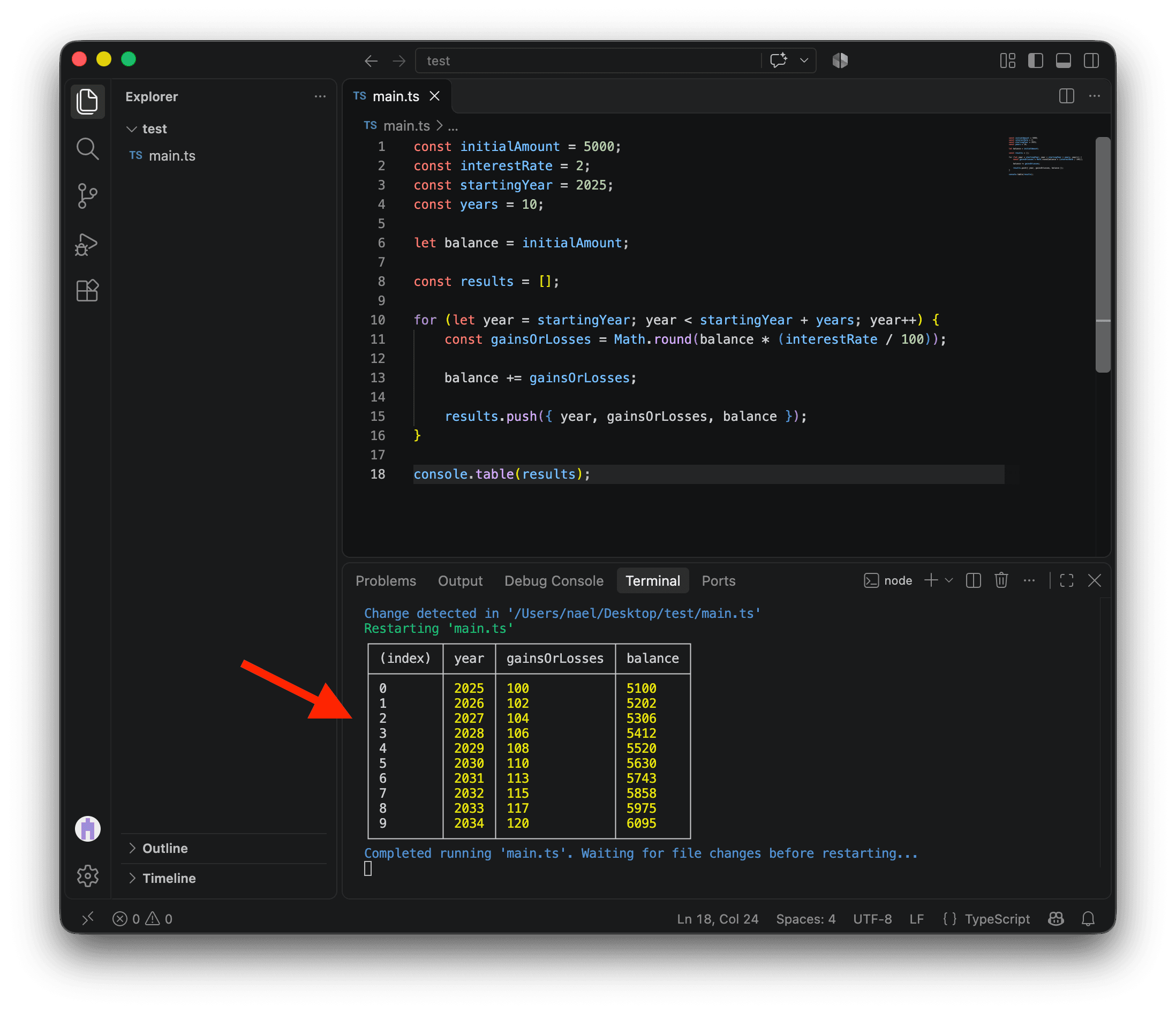
Randomizing interest rates
This is working quite well, but in real life, interest rates fluctuate over time.
Of course, we can’t predict the future, but we can randomize the interest rate to make things a little more interesting.
For that, we can use Math.random(), which returns a number from 0 inclusive to 1 exclusive.
Let’s see it in action by calling it in our loop. We can comment out console.table(results) for now.
const initialAmount = 5000;
const interestRate = 2;
const startingYear = 2025;
const years = 10;

let balance = initialAmount;

const results = [];

for (let year = startingYear; year < startingYear + years; year++) {
  console.log(Math.random());

  const gainsOrLosses = Math.round(balance * (interestRate / 100));

  balance += gainsOrLosses;

  results.push({ year, gainsOrLosses, balance });
}

// console.table(results);There are many random algorithms in the wild. Math.random() returns an approximately uniform distribution, which means you have roughly the same chance of getting any number between 0 and 1. Also, don’t use it for anything related to security. It’s not cryptographically secure.
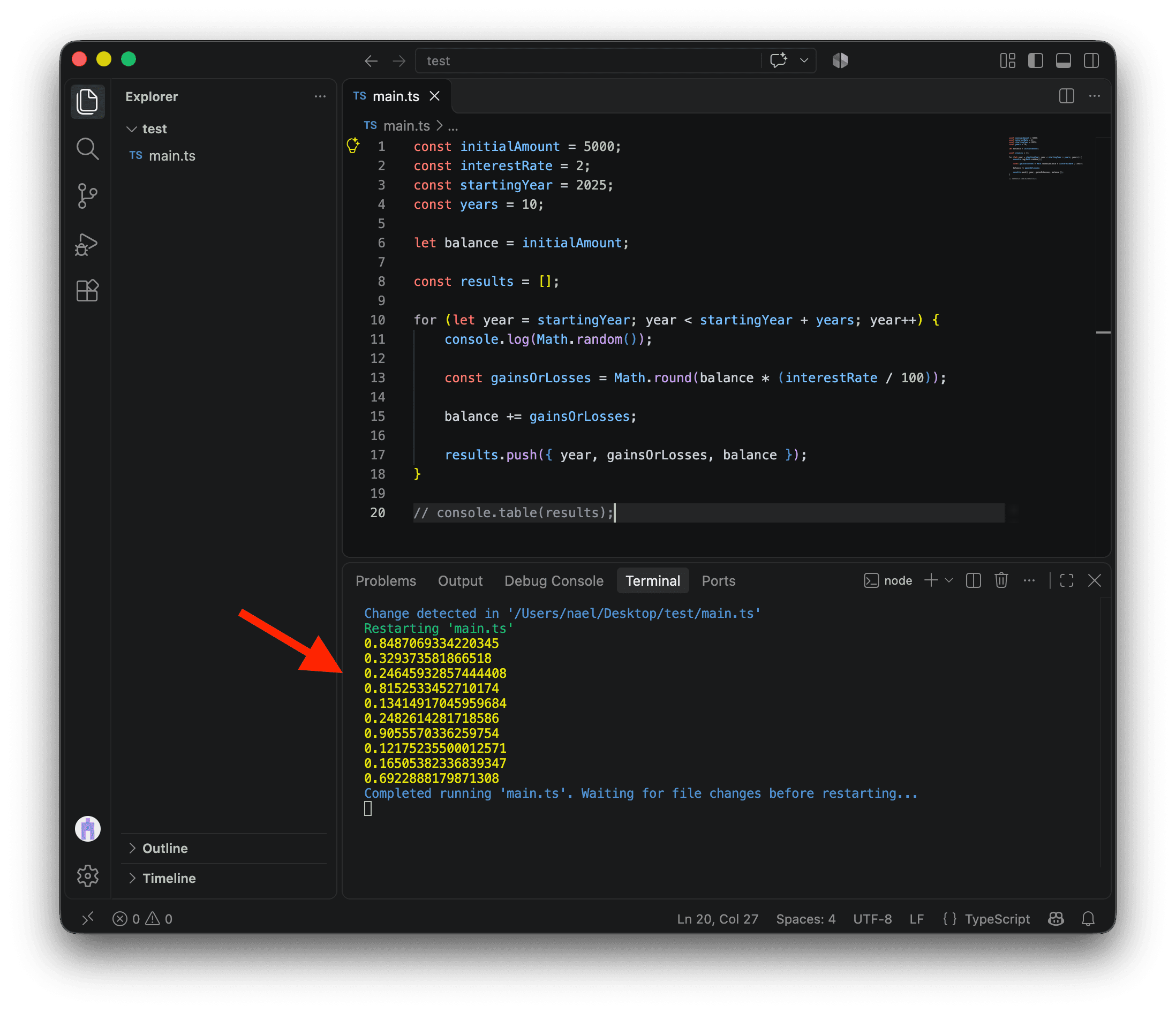
Unless we are extraordinarily lucky, you won’t have the same numbers as me being logged. The only certainty is that we both have numbers between 0 and 1.
To randomize our interest rate (which is 2 right now), we’d like to have something less or more than 2, randomly. This fluctuation could be positive or negative.
To get a random number that’s either positive or negative, we could simply subtract 0.5 from our random numbers.
const initialAmount = 5000;
const interestRate = 2;
const startingYear = 2025;
const years = 10;

let balance = initialAmount;

const results = [];

for (let year = startingYear; year < startingYear + years; year++) {
  console.log(Math.random() - 0.5);

  const gainsOrLosses = Math.round(balance * (interestRate / 100));

  balance += gainsOrLosses;

  results.push({ year, gainsOrLosses, balance });
}

// console.table(results);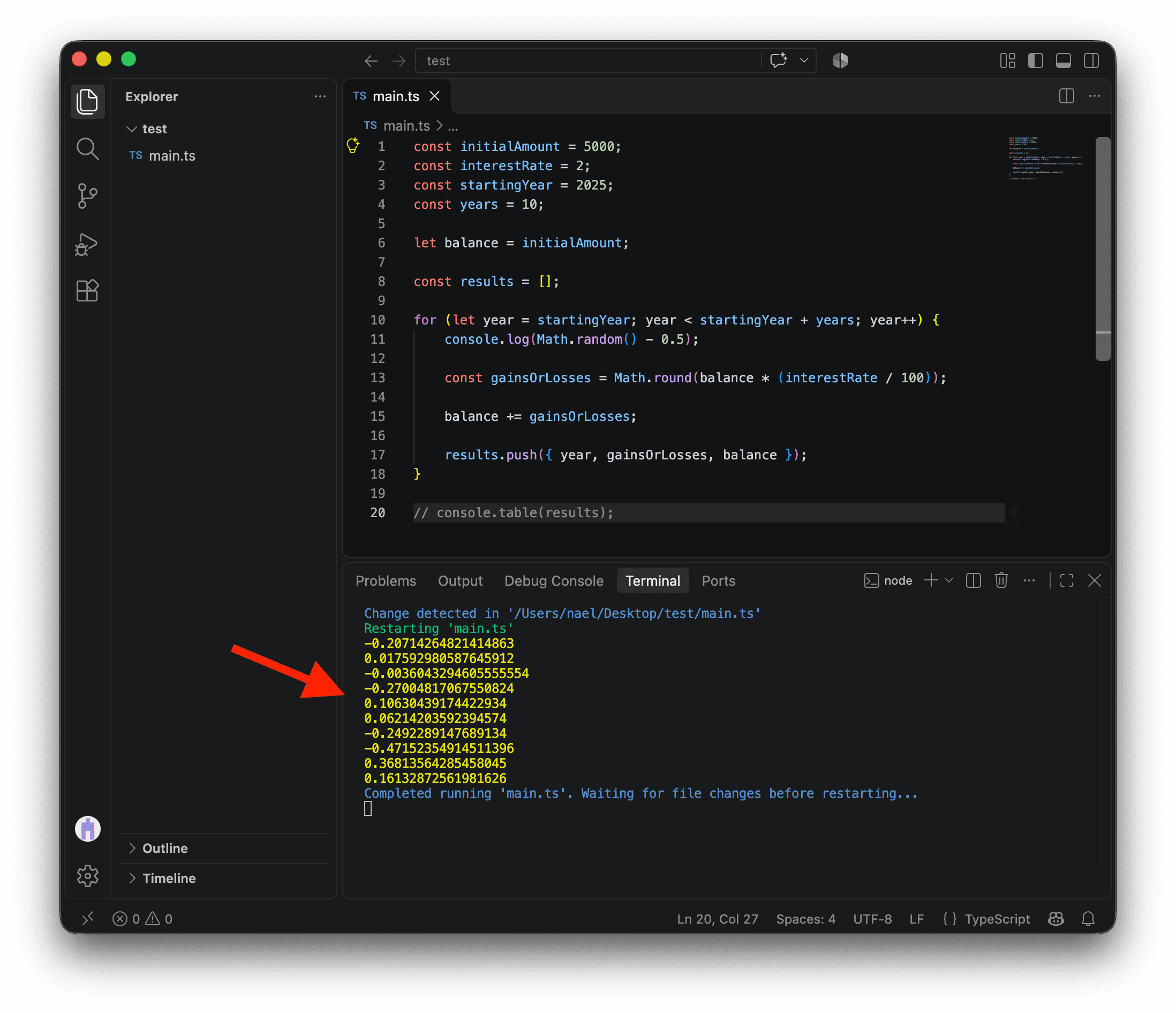
Now that we have random numbers between -0.5 and 0.5, we need to decide on the range of these fluctuations.
We can create a new variable interestRateRange. I’ve set it to 20.
If we multiply our random numbers by this range, we now have random values between -10 and 10. That looks like a great interest rate fluctuation!
const initialAmount = 5000;
const interestRate = 2;
const interestRateRange = 20;
const startingYear = 2025;
const years = 10;

let balance = initialAmount;

const results = [];

for (let year = startingYear; year < startingYear + years; year++) {
  const randomNumber = Math.random() - 0.5;
  const randomFluctuation = randomNumber * interestRateRange;
  console.log(randomFluctuation);

  const gainsOrLosses = Math.round(balance * (interestRate / 100));

  balance += gainsOrLosses;

  results.push({ year, gainsOrLosses, balance });
}

// console.table(results);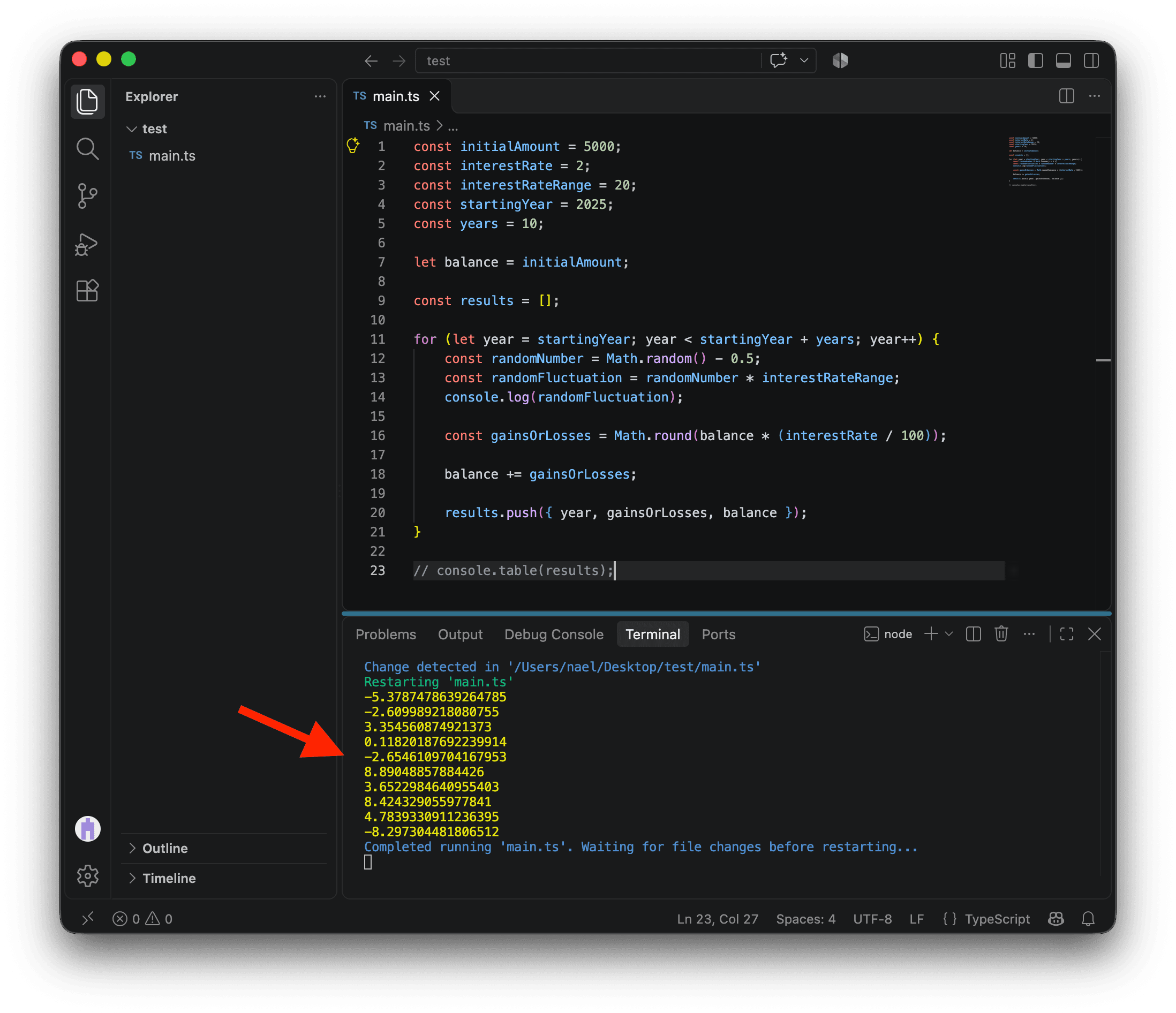
We can now add this fluctuation to our interestRate. Since interestRate is set at 2% in my code, this gives me an interest rate of 2% ± 10% for a given year. This means the interest rate will randomly fall between -8% (a very bad year) and 12% (an amazing performance)!
Let’s update our code and bring back our table. For the sake of simplicity, we can also round our randomInterestRate. Now, every time you save (CMD + S on Mac or CTRL + S on PC), you’ll see different results!
const initialAmount = 5000;
const interestRate = 2;
const interestRateRange = 20;
const startingYear = 2025;
const years = 10;

let balance = initialAmount;

const results = [];

for (let year = startingYear; year < startingYear + years; year++) {
  const randomNumber = Math.random() - 0.5;
  const randomFluctuation = randomNumber * interestRateRange;
  const randomInterestRate = Math.round(interestRate + randomFluctuation);

  const gainsOrLosses = Math.round(balance * (randomInterestRate / 100));

  balance += gainsOrLosses;

  results.push({
    year,
    interestRate: randomInterestRate,
    gainsOrLosses,
    balance,
  });
}

console.table(results);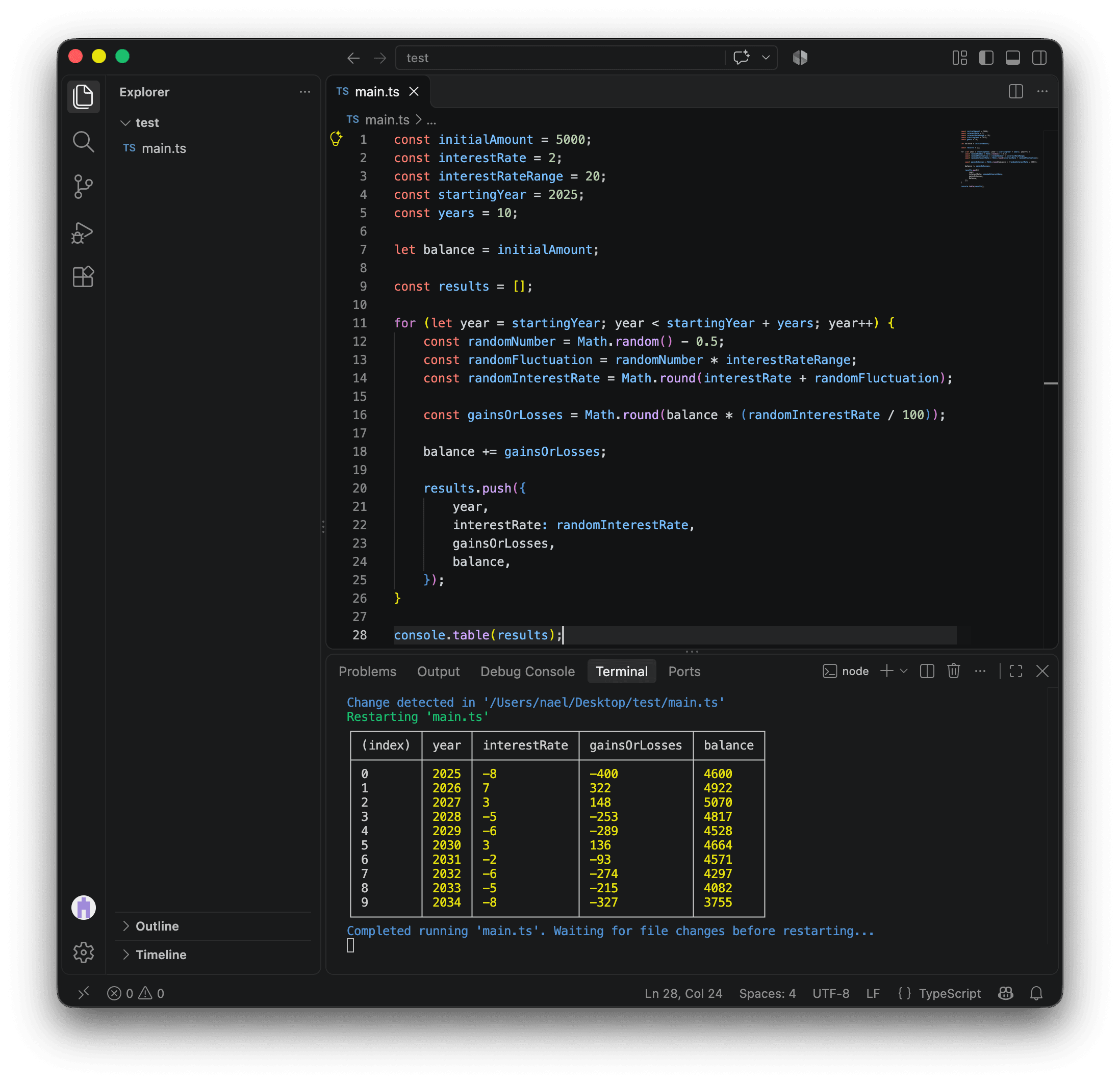
Answering the question
We now have everything we need to answer our question.
First, let’s retrieve the last object in our results array. This object stores the final balance.
Using it, we can calculate the final losses or gains and log the appropriate answer.
const initialAmount = 5000;
const interestRate = 2;
const interestRateRange = 20;
const startingYear = 2025;
const years = 10;

let balance = initialAmount;

const results = [];

for (let year = startingYear; year < startingYear + years; year++) {
  const randomNumber = Math.random() - 0.5;
  const randomFluctuation = randomNumber * interestRateRange;
  const randomInterestRate = Math.round(interestRate + randomFluctuation);

  const gainsOrLosses = Math.round(balance * (randomInterestRate / 100));

  balance += gainsOrLosses;

  results.push({
    year,
    interestRate: randomInterestRate,
    gainsOrLosses,
    balance,
  });
}

// Because the indexes start at 0,
// the index of the last element
// is the number of elements minus 1.
const lastResult = results[results.length - 1];
const finalGainsOrLosses = lastResult.balance - initialAmount;

if (finalGainsOrLosses > 0) {
  console.log("\nCongratulations! You've made money!\n");
} else if (finalGainsOrLosses < 0) {
  console.log("\nSorry! You've lost money!\n");
} else {
  console.log("\nYou've neither lost nor gained money!\n");
}

console.table(results);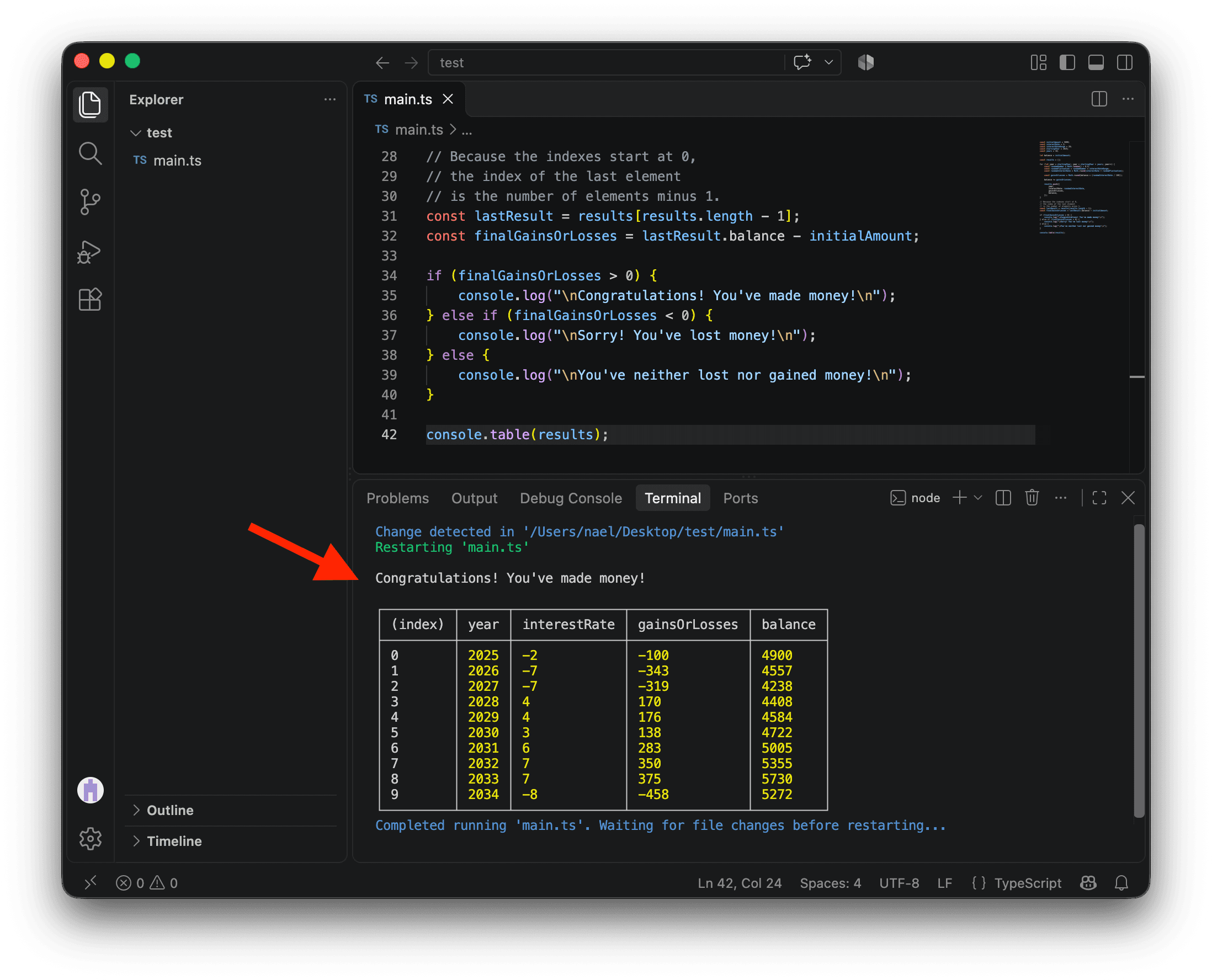
The \n at the beginning and end of the strings on lines 35, 37, and 39 is a special character that indicates a line break. It’s often used in the terminal to add empty lines and make the output more readable.
It would be great to add more details, like the gains or losses made, both in absolute numbers and as a percentage.
const initialAmount = 5000;
const interestRate = 2;
const interestRateRange = 20;
const startingYear = 2025;
const years = 10;

let balance = initialAmount;

const results = [];

for (let year = startingYear; year < startingYear + years; year++) {
  const randomNumber = Math.random() - 0.5;
  const randomFluctuation = randomNumber * interestRateRange;
  const randomInterestRate = Math.round(interestRate + randomFluctuation);

  const gainsOrLosses = Math.round(balance * (randomInterestRate / 100));

  balance += gainsOrLosses;

  results.push({
    year,
    interestRate: randomInterestRate,
    gainsOrLosses,
    balance,
  });
}

const lastResult = results[results.length - 1];
const finalGainsOrLosses = lastResult.balance - initialAmount;
const perc = Math.round(
  (finalGainsOrLosses / initialAmount) * 100,
);

if (finalGainsOrLosses > 0) {
  console.log(`
Congratulations! You've made money!
Initial amount: $${initialAmount}
Final amount: $${lastResult.balance}
Gains: $${finalGainsOrLosses} (+${perc}%)
`);
} else if (finalGainsOrLosses < 0) {
  console.log(`
Sorry! You've lost money!
Initial amount: $${initialAmount}
Final amount: $${lastResult.balance}
Losses: $${finalGainsOrLosses} (${perc}%)
`);
} else {
  console.log("\nYou've neither lost nor gained money!\n");
}

console.table(results);The multiline strings added here use template literals. When you write strings with backticks (`), you can create multiline text. You can also insert variables or code within the string by using ${}. For example, `Two multiplied by two gives ${2 * 2}` will create the string "Two multiplied by two gives 4". Template literals are very useful for creating dynamic text that changes based on your data and analysis results.
Congrats!
Wow! You just coded your first concrete project with TypeScript. You can be proud of yourself.
Tweak the values. Change the parameters. Have fun!
This is just the beginning. Now that you know the basics, who knows where your coding journey will take you? 🚀